2019/04/25

Gallium OS 3 (beta2) on Acer Chromebook


I reinstalled my Acer "CB3-131" Chromebook with GalliumOS v3 beta 2. The procedure to install GalliumOS still applies: https://wiki.galliumos.org/Hardware_Compatibility.


After install, everything just works fine as it did with version 2 Only two small issues were easy to fix:
  • by default, GalliumOS uses the "right alt" for providing access to the functionkeys. On some-keyboard-layouts like azerty, the right alt is already used to access special characters ("alt gr"). This "alt gr" key combination is not working on a default GalliumOS install.
    solution: open the "Keyboard" application and in the "Layout"-tab select the "Chromebook (most models) | Search overlay | F keys mapped to media keys" entry for "Keyboard model". You can now accessing the F-keys by combining them with the search-key. "Alt gr" will now work fine.
  • The volume of the headset and the builtin speakers is very low. As a workaround I added an entry to the "Session and Startup"  with the following command:
    bash -c 'sleep 5 ; amixer -c chtmax98090 set "Speaker" 100% ; amixer -c chtmax98090 set "Headphone" 100%'
    ref:https://www.reddit.com/r/GalliumOS/comments/9o5jix/galliumos_30_audio_volume_low/

2019/03/13

Hanging M3U8 downloads in ffmpeg

On my ubuntu laptop ffmpeg was regularly hanging while downloading a ".m3u8" video stream. Youtube-dl uses ffmpeg under the hood to download those type of files.

e.g.:
ffmpeg -y -loglevel verbose -headers "Accept-Charset: ISO-8859-1,utf-8;q=0.7,*;q=0.7? Accept-Language: en-us,en;q=0.5? Accept-Encoding: gzip, deflate? Accept: text/html,application/xhtml+xml,application/xml;q=0.9,*/*;q=0.8? User-Agent: Mozilla/5.0 (X11; Linux x86_64; rv:59.0) Gecko/20100101 Firefox/59.0?" -i https://cdn.provider.url.../content/.../file.m3u8 -tls_verify 1 -c copy -f mp4 "file:resultingfile.mp4" 
This command would stop at some random point when opening a ".ts" video fragment.
[hls,applehttp @ 0xc16300] Opening 'crypto+https://.../fragment.ts' for reading
Waiting for timeouts and playing with the ffmpeg options didn't seem to help.

An strace would indicate the server is not responding, but still is keeping the socket open.

e.g.: (do NOT run strace as a background process with &)
strace ffmpeg -y -loglevel verbose -headers "Accept-Charset: ISO-8859-1,utf-8;q=0.7,*;q=0.7? Accept-Language: en-us,en;q=0.5? Accept-Encoding: gzip, deflate? Accept: text/html,application/xhtml+xml,application/xml;q=0.9,*/*;q=0.8? User-Agent: Mozilla/5.0 (X11; Linux x86_64; rv:59.0) Gecko/20100101 Firefox/59.0?" -i https://cdn.provider.url.../content/.../file.m3u8 -tls_verify 1 -c copy -f mp4 "file:resultingfile.mp4" > /tmp/ffmpeg.log 2>&1

would gives the following output
... 
socket(AF_INET, SOCK_STREAM|SOCK_CLOEXEC, IPPROTO_TCP) = 5
fcntl64(5, F_GETFL)                     = 0x2 (flags O_RDWR)
fcntl64(5, F_SETFL, O_RDWR|O_NONBLOCK)  = 0
connect(5, {sa_family=AF_INET, sin_port=htons(443), sin_addr=inet_addr("...")}, 16) = -1 EINPROGRESS (Operation now in progress)
poll([{fd=5, events=POLLOUT}], 1, 100)  = 1 ([{fd=5, revents=POLLOUT}])
getsockopt(5, SOL_SOCKET, SO_ERROR, [0], [4]) = 0
open("/etc/ssl/certs/ca-certificates.crt", O_RDONLY|O_LARGEFILE) = 6
fstat64(6, {st_mode=S_IFREG|0644, st_size=235192, ...}) = 0
_llseek(6, 0, [0], SEEK_CUR)            = 0
fstat64(6, {st_mode=S_IFREG|0644, st_size=235192, ...}) = 0
read(6, "-----BEGIN CERTIFICATE-----\nMIIH"..., 233472) = 233472
read(6, "UMlQMAimTHpKG9n/v55IFDlndmQguLvq"..., 4096) = 1720
read(6, "", 4096)                       = 0
close(6)                                = 0
clock_gettime(CLOCK_REALTIME, {tv_sec=1552330418, tv_nsec=452985119}) = 0
gettimeofday({tv_sec=1552330418, tv_usec=453367}, NULL) = 0
gettimeofday({tv_sec=1552330418, tv_usec=453637}, NULL) = 0
poll([{fd=5, events=POLLOUT}], 1, 100)  = 1 ([{fd=5, revents=POLLOUT}])
send(5, "\26\3\1\0\352\1\0\0\346\3\3\\\206\256\373\263ZO\233\356U\344b\204O\3217\275\16fb\331"..., 239, MSG_NOSIGNAL) = 239
poll([{fd=5, events=POLLIN}], 1, 100)   = 0 (Timeout)
...

Perhaps the server was doing some connection throttling?

Workaround: proxy all trafic with tinyproxy
  • Install tinyproxy: sudo apt install tinyproxy
  • tweak the  following config items: sudo nano /etc/tinyproxy/tinyproxy.conf
    # I lowered the timeout from 600s to 60s
    Timeout 60

    ...
    # only accept localhost connections
    Allow 127.0.0.1

    ...
    #'stealth mode'
    DisableViaHeader Yes
  • restart the daemon:
    sudo systemctl restart tinyproxy
  • a quick test will validate the proxy is working:
    wget https://www.google.com -e use_proxy=yes -e http_proxy=127.0.0.1:8888
If you download the m3u8 stream through the proxy, any hickup in the download will trigger a timeout in the proxy and let the download proceed on.

ffmpeg syntax: (recent ffmpeg versions have a -http_proxy option)

http_proxy="http://127.0.0.1:8888" ffmpeg -y -loglevel verbose -headers "Accept-Charset: ISO-8859-1,utf-8;q=0.7,*;q=0.7? Accept-Language: en-us,en;q=0.5? Accept-Encoding: gzip, deflate? Accept: text/html,application/xhtml+xml,application/xml;q=0.9,*/*;q=0.8? User-Agent: Mozilla/5.0 (X11; Linux x86_64; rv:59.0) Gecko/20100101 Firefox/59.0?" -i https://cdn.provider.url.../content/.../file.m3u8 -tls_verify 1 -c copy -f mp4 "file:resultingfile.mp4"

Youtube-dl syntax:
youtube-dl --proxy http://127.0.0.1:8888/ ...

You can check the tinyproxy log to validate the proxy is working correctly:

sudo tail -f /var/log/tinyproxy/tinyproxy.log                                                                                                                                 
INFO      Mar 13 12:34:53 [525]: No upstream proxy for ...
CONNECT   Mar 13 12:34:53 [525]: Established connection to host "ondemand-b.lwc.vrtcdn.be" using file descriptor 8.
INFO      Mar 13 12:34:53 [525]: Not sending client headers to remote machine
CONNECT   Mar 13 12:34:54 [523]: Connect (file descriptor 7): localhost [127.0.0.1]
CONNECT   Mar 13 12:34:54 [523]: Request (file descriptor 7): CONNECT ...:443 HTTP/1.1
INFO      Mar 13 12:34:54 [523]: No upstream proxy for ...
CONNECT   Mar 13 12:34:54 [523]: Established connection to host "..." using file descriptor 8.
INFO      Mar 13 12:34:54 [523]: Not sending client headers to remote machine
INFO      Mar 13 12:34:54 [525]: Closed connection between local client (fd:7) and remote client (fd:8)
INFO      Mar 13 12:34:54 [523]: Closed connection between local client (fd:7) and remote client (fd:8)


2018/06/02

Improving Language Support in Kubuntu 18.04

After a few days of use Kubuntu 18.04 seems quite solid and smooth for my use as a main OS, even on a very limited Intel Celeron CPU N3050  @ 1.60GHz with 4 gigs of memory.

The biggest issue so far with kubuntu is it suboptimal language support, at least compared to regular Ubuntu. Luckily, it's very easy to add full Ubuntu-like support for non English languages by doing a small gnome-detour.

In a Konsole, run the following commands:
$ sudo apt install language-selector-gnome
$ gnome-language-selector
With the gnome-language-selector you can now configure the additional languages you wish to use.

If you don't like the additional gnome dependencies, you can uninstall the gnome-language-selector package afterwards. Kubuntu has also a command line alternative, but I didn't test it by myself:
sudo apt install $(check-language-support)
One last issue I had is that the Konsole (actually Bash) language was somehow set to French. Apparently, Bash is confused when the LANGUAGE environment variable has multiple elements. Start the KDE "Language" application and make sure you have only one "Preferred Language" set.

In the terminal you can check if LANGUAGE has only a single language:
$ locale
LANG=en_US.UTF-8
LANGUAGE=en_US
LC_CTYPE="en_US.UTF-8"
LC_NUMERIC="en_US.UTF-8"
LC_TIME="en_US.UTF-8"
LC_COLLATE="en_US.UTF-8"
LC_MONETARY="en_US.UTF-8"
LC_MESSAGES="en_US.UTF-8"
LC_PAPER="en_US.UTF-8"
LC_NAME="en_US.UTF-8"
LC_ADDRESS="en_US.UTF-8"
LC_TELEPHONE="en_US.UTF-8"
LC_MEASUREMENT="en_US.UTF-8"
LC_IDENTIFICATION="en_US.UTF-8"
LC_ALL=en_US.UTF-8

reference: https://askubuntu.com/questions/769609/how-to-install-additional-languages-in-kubuntu-16-04-lts

2018/03/11

Running Volumio 2 on a Raspberry Pi 2 model B with a 3.5" Touchscreen


I was pleasantly surprised with how well Volumio 2 runs out of the box on my old Raspberry Pi 2 model B using an external USB DAC (in my case, Behringer UCA222). As a next step, I wanted to add a small 3.5 inch display that connects to the 26 GPIO pins of my Pi 2 B.

The setup of the 3.5" LCD screen is a bit tougher than expected, but after a lot of googling and trial and error I got the LCD touchscreen fully working with Volumio 2. It seems like the same display is sold under different brands.

These are the steps to get the display working:
  • connect to your Raspberry Pi CLI through ssh (username: volumio; password: volumio) and execute the following commands
    • download the display driver:
      git clone https://github.com/goodtft/LCD-show
    • run these few commands (handpicked from the LCD35-show script -- do NOT run the script!):
      cd LCD-show/
      sudo mkdir /etc/X11/xorg.conf.d
      sudo cp ./usr/tft35a-overlay.dtb /boot/overlays/
      sudo cp ./usr/tft35a-overlay.dtb /boot/overlays/tft35a.dtbo
      sudo cp -rf ./usr/99-calibration.conf-35-90  /etc/X11/xorg.conf.d/99-calibration.conf
      sudo mkdir -p /usr/share/X11/xorg.conf.d/
      sudo cp -rf ./usr/99-fbturbo.conf  /usr/share/X11/xorg.conf.d/
    • modify the 99-calibration.conf file and add the Driver "evdev" option
      • sudo nano /etc/X11/xorg.conf.d/99-calibration.conf
      • the file should be:
        Section "InputClass"
          Identifier "calibration"
          MatchProduct "ADS7846 Touchscreen"
          Option "Calibration" "3936 227 268 3880"
          Option "SwapAxes" "1"
          Driver "evdev"
        EndSection
      • save the file (Control-X)
    • create a new /boot/userconfig.txt (2020-05 update: this file is automatically included in  /boot/config.txt by Volumio)
      • sudo nano /boot/userconfig.txt
      • add the single line:
        dtoverlay=tft35a
      • save the file (Control-X)
    • install missing packages:
      • sudo apt update
      • sudo apt install lightdm
      • sudo apt install xserver-xorg-input-evdev
    • fix the autologin user for lightdm (updated 2020-05)
      • sudo nano /etc/lightdm/lightdm.conf
      • modify the "autologin" user from "pi" to "volumio":
        autologin-user=volumio
      • save the file (Control-X)
After a reboot, everything works fine :). 


The final product is functional, but not perfect: the boot time takes a few minutes and chromium in kiosk mode is not very snappy. This might be a limitation of the older Raspberry Pi hardware. But as a simple display and for basic pause/play interaction, it works.

You can optionally disable the sleep mode and change the orientation of display in the Touch Display Plugin settings:


The "classic" layout (settings > appearance) seems to work out a bit cleaner on a small display:


References:


2018/02/21

Ubuntu 17.10 Fixing Intel Graphics Issue on Medion Akoya e1210

On a fresh Ubuntu install on my old Medion Akoya e1210 netbook with Intel Graphics the screen is
now corrupted. In the past this never caused any issues. I tried a few Ubuntu derivatives (16.04, 17.10, Xubuntu, Ubuntu Mate & Lubuntu), but the issue remains. The classical tip of using "nomodeset" solves the issue, but uses a suboptimal resolution for the display.

This is my configuration:
$ lspci -nnk | grep -iA2 vga
00:02.0 VGA compatible controller [0300]: Intel Corporation Mobile 945GSE Express Integrated Graphics Controller [8086:27ae] (rev 03)
    Subsystem: Micro-Star International Co., Ltd. [MSI] Mobile 945GSE Express Integrated Graphics Controller [1462:0110]
    Kernel driver in use: i915

I finally found the simple workaround until this is fixed upstream:
  • during boot hold down the "shift" key to show the Grub menu
    • in "advanced", choose the latest kernel in "recovery" mode
    • now continue the boot normally: the GUI will show up correctly when started from recovery.
  • open a terminal
    • sudo nano /etc/default/grub
    • at the end of the file, add the following line:
      GRUB_GFXPAYLOAD_LINUX=text
    • save the modified file
    • now run
      sudo update-grub
After rebooting, the logon screen should show just fine. 

reference:


2018/02/18

Fixing Black Screen after Boot on Ubuntu 16.04 & 17.10 (Intel Graphics)

On my Dell laptop with Intel Graphics I suddenly experienced a black screen on booting Ubuntu
16.04 and later. I reinstalled Ubuntu and tried out some Ubuntu derivatives (Mint, Xubuntu), but that didn't help. The classical tip of using "nomodeset" didn't help either.

This is my configuration:
$ lspci -nnk | grep -iA2 vga
00:02.0 VGA compatible controller [0300]: Intel Corporation Atom/Celeron/Pentium Processor x5-E8000/J3xxx/N3xxx Integrated Graphics Controller [8086:22b1] (rev 21)
    Subsystem: Dell Atom/Celeron/Pentium Processor x5-E8000/J3xxx/N3xxx Integrated Graphics Controller [1028:06ac]
    Kernel driver in use: i915

I finally found the simple solution:
  • during boot hold down the "shift" key to show the Grub menu
    • in "advanced", choose the latest kernel in "recovery" mode
    • now continue the boot normally: the GUI will show up correctly when started from recovery.
  • open a terminal
    • sudo nano /etc/default/grub
    • search for splash in this file and modify it into nosplash
    • save the modified file
    • now run
      sudo update-grub
After rebooting, the logon screen should show just fine. 

reference: https://askubuntu.com/questions/1004912/ubuntu-16-04-3-lts-nosplash-parameter-causes-major-issues.

2017/04/24

Lenovo Yoga 2 11" - Fixing Wifi and Bluetooth under Ubuntu 16.04.2

The Lenovo Yoga 2 11" convertible laptop has a compelling form factor and gives a solid impression. Unfortunately it's not a Linux-friendly laptop as far as wireless is concerned. Under Ubuntu 16.04.2 with a very recent 4.8 kernel, the wifi and bluetooth are not working. To add insult to injury, Lenovo has hardcoded the Broadcom wifi and bluetooth card in the UEFI bootloader, so the laptop refuses tot boot with any replacement wifi card I tested.

This post details how I managed to get the Broadcom wifi and bluetooth up and running under Ubuntu 16.04.2. Actually, I'm running KDE Neon which is built on 16.04, but the solution should be the same. I used a simple USB3 ethernet dongle for providing initial wired internet connectivity.

wifi

the following card is installed in my device:
$ lspci -nn | grep -i broad
01:00.0 Network controller [0280]: Broadcom Corporation
BCM43142 802.11b/g/n [14e4:4365] (rev 01)
steps to support the wifi card:
  • deactivate secure boot in the UEFI settings
  • install the following packages (run in a terminal)
sudo apt install bcmwl-kernel-source firmware-b43-installer
reference:  https://askubuntu.com/questions/55868/installing-broadcom-wireless-drivers

bluetooth

The bluetooth device is known in Linux as:
$ lsusb | grep Bluetooth
Bus 001 Device 006: ID 105b:e065 Foxconn International, Inc. BCM43142A0 Bluetooth module
By default, the firmware is missing due to legal concerns:
$ dmesg | grep -i blueto
[    7.060475] Bluetooth: Core ver 2.21
[    7.060503] Bluetooth: HCI device and connection manager initialized
[    7.061584] Bluetooth: HCI socket layer initialized
[    7.061593] Bluetooth: L2CAP socket layer initialized
[    7.061607] Bluetooth: SCO socket layer initialized
[    7.084378] Bluetooth: hci0: BCM: chip id 70
[    7.105106] Bluetooth: hci0: michael-Lenovo-Yoga-2-11
[    7.105112] Bluetooth: hci0: BCM (001.001.011) build 0000
[    7.110415] bluetooth hci0: Direct firmware load for brcm/BCM.hcd failed with error -2
[    7.110423] Bluetooth: hci0: BCM: Patch **brcm/BCM.hcd not found**
There is a Github repository with recent Broadcom bluetooth firmware files, so you don't have manually extract and convert the relevant files from the usb driver.

Install the BCM.hcd file in a terminal:
$ sudo apt install git
$ cd
$ git clone https://github.com/winterheart/broadcom-bt-firmware.git
$ cd broadcom-bt-firmware/brcm
$ ls -l BCM43142A*
Now pick and choose the file that matches the usb device id from the lsusb command above.
$ sudo cp BCM43142A0-105b-e065.hcd /lib/firmware/brcm/BCM.hcd
Finally power off / on your pc -- askubuntu explicitly advises against a simple reboot. In my case a simple modprobe cycle was enough:
$ sudo modprobe -r btusb
$ sudo modprobe btusb
Reference with much more in depth details: https://askubuntu.com/questions/632336/bluetooth-broadcom-43142-isnt-working


2017/02/22

Sound Stuttering Issues on Gigabyte GB-BXBT-2807 in Ubuntu Mate 16.04

I experienced random sound stuttering issues on my Gigabyte GB-BXBT-2807 running Ubuntu Mate 16.04. At first, I was investigating PulseAudio, but this was NOT the issue (see https://wiki.ubuntu.com/PulseAudio/Log and http://steamcommunity.com/app/8930/discussions/1/540744299662467088?ctp=4).

After some research it appears that the Realtek Wifi driver was to be blamed: every time the wifi driver scans for accesspoints, the +/ 50ms latency occured. Simply disabling wifi solves the issue. In my case I use a wired connection, so I just removed the RTL8723BE mini PCIe card. Problem solved.

More background info on this bug: https://bugzilla.redhat.com/show_bug.cgi?id=1262957 and https://bugzilla.kernel.org/show_bug.cgi?id=108461


2017/01/08

Running the USB EasyCAP Video Capture Device in Ubuntu 16.04

I bought an external USB2 video capture device in order to convert old VHS material to digital and to let the kids play with an old vtech v.smile game console on Linux. The device I ended up was a "Mumbi Video Grabber USB 2.0" from Amazon (e.g. https://www.amazon.de/dp/B0042EZ596/ref=pe_217221_31005211_dp_1). It appears that this device is a clone of the so-called "EasyCAP" device. This chipset is well supported under Linux: https://linuxtv.org/wiki/index.php/Easycap.

Technical details:
$ lsusb
...
Bus 001 Device 008: ID 05e1:0408 Syntek Semiconductor Co., Ltd STK1160 Video Capture Device
Although the video capture function did work out-of-the-box, I had some trouble with grabbing the sound.

I ended up with the following bash script that reliably captures the video AND sound. Just create a shell-script file in your home-directory, add the "execute" permissions and create a launcher that references your script.
#!/bin/bash
amixer -c stk1160mixer sset Line unmute cap 
cvlc -vvv --color --input-slave=alsa://pulse --live-caching=300 \
  --v4l2-standard=PAL  --deinterlace-mode=yadif \
  --video-filter=deinterlace v4l:///dev/video0
Details about this script:
  • by default the sound from the USB device is muted. You have to unmute it with the amixer command or, manually, with the alsamixer interface. See https://linuxtv.org/wiki/index.php/Stk1160#Enable_sound_capture for details. 
  • cvlc runs VLC without the window decorators (menu, etc.). This is handy for having a simple launcher for the kids. Use plain vlc if you don't mind the menus and buttons. 
  • Ubuntu use pulse-audio, so it is important tot use the "pulse" input-slave parameter. I couldn't get other suggested settings like "hw2,0" etc. to work, so stick with "pulse"...
  • You can try to improve the deinterlace-mode. See https://wiki.videolan.org/deinterlacing#VLC_deinterlace_modes for possible values and how they work.
Known issues: 
  • Make sure you configure the video capture device as your sound input device in "Sound Settings":
  • The linuxtv wiki says that the amixer command must only be run once, but I ended up running it always. This doesn't seem to have any bad effects, so I left it in for now.
  • When plugging in the USB stick on a live Ubuntu system, the stk1160mixer is not always present. I had the most reliable operation by plugging in the USB device before booting.
And it all works :


2017/01/04

Fixing an external USB3 ethernet adapter (Realtek r8152) in Ubuntu 16.04

I have an external USB3 ethernet adapter that wasn't working under Ubuntu 16.04.

Details of the adapter:

$ lsusb
...
Bus 001 Device 012: ID 0bda:8153 Realtek Semiconductor Corp. 
Bus 001 Device 011: ID 2109:2812 VIA Labs, Inc. VL812 Hub

$ lsmod | grep r8152
r8152                  49152  0
mii                    16384  2 r8152,usbnet
Error log:
$ dmesg
...
[ 584.877219] usb 1-2.3.3: reset high-speed USB device number 15 using xhci_hcd
[ 585.017923] r8152 1-2.3.3:1.0 eth0: v1.08.2
[ 586.623086] r8152 1-2.3.3:1.0 enx00e04c...d: renamed from eth0
[ 586.658451] IPv6: ADDRCONF(NETDEV_UP): enx00e04c...d: link is not ready
[ 586.708837] IPv6: ADDRCONF(NETDEV_UP): enx00e04c...d: link is not ready
After some googling, I found that the issue is related to the USB autosuspend feature (https://bugzilla.redhat.com/show_bug.cgi?id=1236679). Luckily, the fix is very easy:
sudo nano /etc/default/tlp
and in this file add the following line:
# Exclude listed devices from USB autosuspend (separate with spaces).
# Use lsusb to get the ids.
# Note: input devices (usbhid) are excluded automatically (see below)
#USB_BLACKLIST="1111:2222 3333:4444"
USB_BLACKLIST="0bda:8153"
After a reboot, the USB3 wired ethernet works just fine:
$ dmesg
...
[ 87.910485] IPv6: ADDRCONF(NETDEV_CHANGE): enx00e04c...d: link becomes ready

2016/11/25

OWASP Benelux 2016, Conference day

slides: https://www.owasp.org/index.php/BeNeLux_OWASP_Day_2016-2#tab=Conferenceday

Securing Android Applications

Dario Incalza
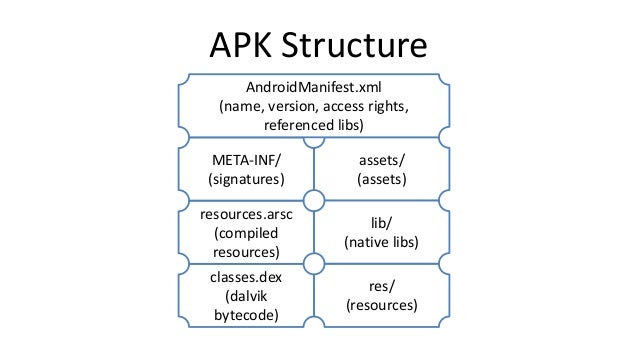
apk: http://image.slidesharecdn.com/english-final-140610053432-phpapp02/95/android-applications-in-the-cruel-world-how-to-save-them-from-threats-6-638.jpg?cb=1402390537
tools:
recommendations

The State of Security of WordPress (plugins)

Yorick Koster
wordpress: blogging software with CMS features

Securing AngularJS Applications

Sebastian Lekies
AngularJS
  • "declarative templating"
  • contextual auto escaping (html, url, resource_url)
    • managed by the $sceProvider
    • URL / output $compileProvider
    • auto-encoding
    • URL validation: $sceDelegateProvider resourceURLWhitelist / Blacklist
  • html sanitizer: removes all script
security pitfalls
  • do not generate templates based on user input
  • do not write user input befor AngularJS is loaded -- careful with mixing other libraries
  • inserting HTML in DOM
    • ngBindHtml with trustAsHtml -- security is disabled! -- use ng-bind-html
    • DIY escapeForHtml() call --managing security on your own is dangerous: AngularJS will sanitize the input for you
    • do not use jqLite
  • white/blacklisting URLs
    • wildcards in schemes:
    • wildcards in domains: replace domainname
      • toplevel domains: replace them with your own (my.evil.com
    • regexps
    • conclusion: ONLY whitelist specific URLs, do NOT use regexp / wildcards

Compression Bombs Strike Back

Giancarlo Pellegrino
Compression
  • main lossless algorithm: deflate (zlib, gzip etc)
  • protocols: IMAP, XMPP, SSH, HTTP response:
    • Accept-Encoding: deflate/gzip
    • Content-Encoding: gzip etc
issues
  • DOS "computationally intensive"
  • data amplification
  • unbalance client/server (server caches compress file, client always decompresses)
old issues
  • zip bombs: 42kb -- 4.5PB unzipped (1996)
  • xmlbombs: recursive entities (2003)
present
attention points
  • first authenticate before uncompressing
  • input validation: size (check decompression ratio, limit size of decompressed message)
  • correctly chain + interprete payload
  • logger: resource exhaustion (e.g. decompress before logging)
  • zip size header can be different than actual zipped content
https://www.usenix.org/conference/usenixsecurity15/technical-sessions/presentation/pellegrino

Zap it !

Zakaria Rachid
https://www.owasp.org/index.php/OWASP_Zed_Attack_Proxy_Project
use cases
  • simple scanning
  • automatic security integration tests
    docker pull owasp/zap2docker-weekly
    docker run owasp/zap2docker-weekly zap-baseline.py -t http://target
    
  • security plugin
  • zap api

Stealing Secrets through Browser-based Side-channel Attacks

Tom Van Goethem
  • compression: guess char-by-char and check if this impacts response size
    • gzip + input controlled by attacker (or mitm)
  • find out response size:
    • cache api: + authenticted cross-origin responses
      • quota restrictions - can calculate response size of other site
      • getEstimate(): exact quota
      • but: after decompression
    • tcp windows: extra round trip
      • measure number of roundtrips
protection
  • no compression, but bandwidth
  • do not compress secrets
  • samesite cookies
  • no third party cookies

Handling of Security Requirements in Software Development Lifecycle

Daniel Kefer
demo

Closing Keynote: The Future of Security

Bart Preneel

trends
  • big data / analysis
    • visibility
    • mass surveillance
  • privace as security property
  • privacy by design:
    • "General Data Protection Regulation" GDPR
  • cryptowars continue
  • offense over defence (0-days)
recommendations
  • avoid single point of failure / trust
  • future
    • future of internet: simple but secure
    • small local data instead of centralised
    • distributed solutions (e.g. bitcoins)
    • big data --> encrypted data
    • open source solutions

2016/11/11

Devoxx 2016 - day 5: notes (2016/11/11)

Java Language and Platform Futures: A Sneak Peek

Brian Goetz

possible improvements
  • type inference for local variables
  • taming boilerplate
    • equals, hashCode toString...
    • IDE help for writing but not reading
    • e.g. data classes class Point(int x, int y){ } (but complex issues to solve)
  • improved switch: eg pattern matching
  • project valhalla: value types / better Data layout (complex)
  • specialized generics
  • project panama: efficient native code (better JNI)
others:

Flying services with the drone

Krzysztof Kudrynski, Blazej Kubiak


Building Chat Bots - The Next Gen UI

James Ward

  • chat channels: slack, facebook messenger
  • natural language / interactive
  • protocols: no standards
  • demo

2016/11/10

Devoxx 2016 - day 4: notes (2016/11/10)

Programming your body with chip implants

Pär Sikö

chip: 12mm / 2mm -- same as for pets
  • rfid: entrance system
  • nfc: smartcards: 1kb
issues
  • battery -- energy harvesting
  • communication technology
    • active

Optional - The Mother of All Bikesheds

Stuart Marks

Optional
  • java 8 (java.util)
  • non-null ref (present) or empty (absent)
  • primitives: OptionalInt, Long etc
  • never use "null" as ref in Optional
  • "limited mech for returntypes where null will very likely return errors" e.g. streams api: Optional prevents NPE's in chained calls
  • issue NoSuchElementException
usage of Optional
  • never call "Optional.get()" when you can prove that the Optional is present
  • prefer alternatives to Optional.isPresent() / .get()
    • use: orElse() / orElseGet() / orElseThrow()
  • Optional.filter() predicate
  • Optional.ifPresent(): (<> isPresent) executes lambda if present
  • other methods
    • empty()
    • of()
    • flatMap()
    • ...
  • stream of Optional: .filter(Optional::isPresent).map(Optional::get).collect() -- filters present Optionals & extract values
misuses:
  • simple nullchecks - avoid Optional.isNullable. chainsgh
  • too complex constucts: Optional chains should be avoided
  • Optional.get() "attractive nuisance" -- will be deprecated
  • do not use Optional for
    • fields
    • method parameters
    • collections
    • replacing every null
  • Optional adds extra objects -- check performance issues
  • no identity-sensitive operations (e.g. serialization)

A Crash Course in Modern Hardware

Cliff Click

  • classic Von Neumann Architecture
  • throughput / core +10% / year (single-threaded)
  • CISC: easier to program, but harder to optimize (pagefaults)
  • RISC: simpler, but faster execution
  • walls:
    • power wall
    • ILP wall (branch prediction, speculative execution)
      • pipelining
        • better throughput, but latency remains
      • cache misses: stall -- performance = cache misses
      • branch predictions: 95% success
      • Itanium: static ILP: not much gain for huge effort
      • x86: limited by cache misses / branch mispredicts
      • locality is critical
    • memory wall
      • memory is larger, but latency is still high (DRAM)
      • SRAM for caches
        • requires data locality
        • cache layers
      • "memory is the new disk"
      • faster memory
        • relax coherency constraints
        • better throughput
    • speed of light
  • flat clock rates (15y)
    • hyper-threading: same limits (cache misses)
    • more cores
      • challenges:
        • chips reorder
        • concurrency is hard
        • immutable data
        • missing toolsets

The ISS position in real time on my mobile in less than 15mn ? Yes, we can.

Audrey Neveu

  • api.open-notify.org
  • ionic + cordova
  • server-sent events: push technology: text-only
    • streamdata.io for streaming the server-sent-events
    • JSON-patch RFC-6902 for changes demo
  • ionic start iss.io maps (=template)
  • ionic serve --lab
  • bower.json --> bower install

graph databases and the "panama papers"

Stefan Armbruster

panama papers: 2,6 TB data
property graph model
  • nodes: entities (can have name/value properties
  • relationships: type + direction (=semantic)
neo4j usecases
  • internal
    • network / it operations
    • data management
  • customer facing
    • real-time recommendations
    • graph based search
    • identity/access management
neo4j:
  • graph database -- easy to draw structure
  • solves relational pains (logical vs table model)
  • open source
  • easy to use
  • ACID
  • scalable (3.1)
  • syntax
    • patterns: (:Person{name:"Dan"})-:KNOWS>(:Person{name:"an"})
    • clauses CREATE / MERGE / SET/DELETE..
    • MATCH > WHERE <>
      • ORDER BY <>
      • paginationSKIP / LIMIT
    • LOAD CSV
  • demo

A JVM does That?

Cliff Click

 services -- "Virtual"
  • high quality GC
  • high quality machine code gen
  • uniform threading / memory model
  • type safety
  • ...
Illusion:
  • infinite mem -- gc pauses
    • jvm optimizes
  • byte code is fast:
    • JIT brings back expected cost model (gcc -O2 level)
    • JIT requires profiling
  • virtual calls are slow: java makes them fast
    • inline caches
  • partial programs are fast: requires deoptimization, reprofile, reJIT
  • consisten memory model: every machine has different memory models -- JVM handles this
  • consistent thread model: JVM imporves locking etc
  • Locks are fast
  • quick time access: difficult on hardware / multiple threads *
    • gettimeofday in java
wishes for the future:
  • tail calls
  • Integer as cheap as int
  • BigInteger as cheap as int
  • atomic multi-address update (software transactional memory)
  • thread priorities: on linux -- only as root
  • finalizers: "eventually" runs -- might be never (no timeliness guarantees)
  • soft/phantom refs: difficult to maintain in GC 

2016/11/09

Devoxx 2016 - day 3: notes (2016/11/09)

Keynote

  • AI / machine learning
    • lots af labeled datasets
    • products
      • tensorflow
  • java 9:
    • modules
      • jlink
    • jshell (REPL interface)
  • java future
    • small improvements: property-classes
    • Panama: improve JNI
      • demo: opencv (detect image contents)
      • cleaner interaction with native code

Security and Microservices

Sam Newman

intro
transport security
  • threatmodel
  • https everywhere:
    • server guarantee / tampering prevention
    • letsencrypt.org
  • client side certs: difficult -- Lemur
  • auth
    • oauth
    • form auth
    • "confused deputy problem": multiple access paths complicate security
      • saml assertions: complex
      • oauth token validated in services
data at rest
  • encrypted datastore
  • vault for password storage
docker issue
  • scans
  • build them yourself
code
logs
  • centralize in ELK

The road to Node Package Manager Hell

Paul Watson

dependency checker:
  • owasp dependency checker
  • commercial: snyk.io / nodesecurity.io
yarn
  • alternative npm client
  • fast
  • autolock dependencies
  • deterministic installs
  • offline installs
others:
  • Nexus / Arifactory
  • gradle gulp / node plugin

Modern web development using Aurelia

Harro Lissenberg

aurelia http://aurelia.io/
  • javascript framework
  • clean & non-obstrusive
  • no dependencies -- uses its own polyfills
  • MIT license
demo
  • cli for project setup
  • yarn install
  • require.js
  • recent ecmascript --> export class {}, constructor etc.
  • au run -watch for testing
  • repeate.for attribute with list of elements

Containers, VMs, Processes… How all of these technologies work ? Deep dive and learn about your OS

Quentin ADAM

process isolation
  • chroot
    • security risks (root, escape, ...)
  • jail / containers
    • linux cgroups: (docker)
      • some security risks
      • filedescriptors shared fS or full OS
  • vm (e.g. qemu)
    • simulate cpu
    • VT-X instruction-set
    • performance?
      • cpu / memory- bound? usually not an issue
      • I/O system
        • storage
        • network
others:

100% Stateless with JWT (JSON Web Token)

Hubert Sablonnière

intro:
  • cookies
  • sessionid
    • shared / distributed cache (memcached etc)
    • or sticky session
jwt
  • comparable to sessionids
  • types
    • by reference
      • bankcard ref needed
    • by value
      • realmoney --> no extra data needed
  • initial
    • wiret +sign
    • set JWT as cookie
  • after
    • verify each request
  • parts:
    • payload: claims + extra data
      • iss issuer
      • sub subject emaetc
      • times exp / nbf /iat
      • jti id
      • claims
    • signature
      • symetric e.g. hmac256
      • asymetric signature
  • oauth2 / openid connect
    • based on jwt
  • benefits
    • no loadbalancing:
      • shared secret on all servershtt
      • or public key on all servers en secret only on logon-service
    • multilanguage
  • drawbacks
    • revocation
      • blacklist or whitelist?
    • single page applications // security?
      • xss with data in local storage
        • 3rd party scripting
        • solution: HTTPonly cookies
    • mobile apps
      • Authorization: Bearer header instead of cookie
    • csrf:
      • use local storage + add csrf token in payload
      • interceptor to send csrf token on each ajax request
  • others
    • multipart forms
    • emails: jwt for reset email
    • api gateway with sessionid, but use internally JWT: api gateway does the transformation

Testing Legacy Code

Elliotte Rusty Harold

http://www.cafeaulait.org/slides/sdbestpractices2006/legacy/
  • create broader tests first
  • prefer unit test over integration test
  • concentrate on changes
  • junit, testng etc
  • create initial setup (before / after) and add easy tests
  • trial & error to tweak a new test
  • also test obvious cases
  • remove dead code
  • code coverage: focus on missed elements:
    • Emma, Cobertura.
    • covered != tested...
  • autogenerate tests? avoids boilerplate
  • static analysis: Findbugs, PMD,...
  • refactoring: watch out for reflective access (hibernate, etc)

Wait, what!? Our microservices have actual human users?

Stefan Tilkov

  • single frontend that connects to multiple services?
  • orchestration: complex
  • functional services
    • services with DB-access -- JDBC in disguise -- too low level
    • reuse is sideeffect
  • UIs matter most (not the services)
    • can become a big monolith
    • failure in the long run
  • "virtical responsibility": http://scs-architecture.org/
    • single team responsible for full slice
    • modularize frontend
  • frontend tech is not an implementation detail!
    • impacts architecture
    • decision to be made upfront
  • frontend
    • web: server vs client rendering
      • simple links (=resources)
      • redirection
      • transclusion: embedding other apps with javascript -- Web Components?
      • argument to avoid native
    • hybrid: try to use webbased
    • native: platform specifics
      • single monolith "by definition"
      • only internal modularization
  • solution frontend
  • summary
    • UIs matter
    • use the correct architectural style
    • frontend monoliths: as good /bad as backend monoliths

2016/11/08

Devoxx 2016 - day 2: notes (2016/11/08)

Array Linked to a List, the full story!

José Paumard


https://stuartmarks.wordpress.com/2015/12/18/some-java-list-benchmarks/
basic operations
  • list.sort
  • list.removeIf()
  • forEach
  • stream()
  • ... random:
  • arraylist
    • will never shrink
    • arraycopy operations
  • http://www.hackersdelight.org/
  • linkedlist:
    • som costly operations
benchmarks: JMH
cpu architecture
Java 9
  • List.of()
  • Set.of()
demo

Exploring Java 9

Venkat Subramaniam

Modularity
  • big rt.jar split in modules ("jmods" subdir)
  • java.base: default dependencies
  • other code also in modules
  • rule: no cycles (cyclic dependencies)
module
  • collection of packages / data
  • name
  • "requires"
  • "exports": only exported stuff can be used
  • convention: put module in dedicated dir
  • module-info.java in a top-level directory
    • module { export ; }
    • "requires java.base;" automatically added
  • public is not "public" anymore -- module-bound
  • examine dependencies
    • jdeps -s (exists since java 8)
    • -Xdiag:resolver
    • java -listmods -- JRE dependencies
  • implied readability: support transitive dependencies
    • "requires public"
  • transition to java 9:
    • jdeps -genmoduleinfo outputdir *.jar
    • put old jars in module path (-mp option)
    • "automatic modules"
    • uses name of jar instead of name of module"
    • classpath: "unnamed module" -- 'quarantined' module (exports all)
  • versions: still ongoing
others
  • jlink: create platformspecific binary executable -- "java"
  • REPL "read evaluate print loop" -- jShell: snippets

The end of polling : why and how to transform a REST API into a Data Streaming API?

Audrey Neveu

"realtime user experience"
  • no refresh buttons
  • solutions
    • polling -- chatty protocol / inefficient
    • alternative
demo with http://streamdata.io and a drone

Open Sesame! Conversations With My Front Door

Maurice Naftalin

raspberry pi for controlling dooropener
  • python
  • asterisk: voip solution
    • complex setup / config
    • freepbx (commercial modules)
    • Asterisk-Java: support Fast AGI -- server on 45373
    • dialplay: voice recognition -- IBM Watson speech recognition service for converting the codes
    • DTMF is more reliable for entering a code future:
    • Natural Language Processing

Notes on Type Theory for absolute beginners

Hanneli Tavante

intro to Type theory
steps:
  • collect all keywords / analyse gramar
  • replace with mathemetics
  • remove duplicates
  • symbolic logic
  • environment (set of classes / variables)
  • predicate logic to analyse your system
  • lambda calculus
  • ...

2016/11/07

Devoxx 2016 - day 1: notes (2016/11/07)

Deep Learning: An Introduction

Breandan Considine


examples
reasons
  • big data
  • hardware (nvidia cuda)
  • algorithms
machine learning fundamentals
  • tensors: n-dimensional array
  • learning types:
    • supervised
    • unsupervised
    • reinforced
tensorflow examples
  • linear regression: single line in data
  • classification
    • "perceptron"
    • layers + weighs "gradient descent"
unsupervised learning
  • clustering, separation, association
  • clustering: random points, euclidean distance
data preprocessing
  • feature scalin,g normalization
  • decomposition & aggregation
  • dimensionality reduction
  • --> training set, validate & select best modelf
DeepLearning4J
  • builder pattern
  • components:
    • nd4j -- n-dimensional arrays reinforcement learning
  • agent has context + choices
  • rewards
  • goal: maximize cumulative reward
refs:

Make CSS Fun Again with Flexbox!

Hubert Sablonnière


refs:
flex:
  • float styles are only for text flow
  • display: flex: // flex: 1 ( for 1 row)
    • parent / flexcontainer
    • children: elements
  • flex-grow: weight
  • flex-shrink: minimum
  • flex-basis: default
others
  • justify-content: center / flex-end
  • align-items: center

Easily secure your Front and back applications with KeyCloak

Sébastien Blanc


http://www.keycloak.org/
Open Source Identity and Access Management
  • jwt (rfc 7519)
  • openid, kerberos etc
  • adapters (wildfly, spring boot, node.js ...)
  • native clients
  • login brokers
  • otp
demo
  • web.xml: roles/ security config
  • keycloak.json config
  • atom editor https://atom.io/
  • node.js: add keycloak.protect()

Sentiment analysis of social media posts using Apache Spark

Niels Dommerholt


http://spark.apache.org/ dataprocessing engine

sentiment analysis
  • positive / negative
  • java 8 / streams api
  • coursera
demo
  • JavaSparkContext: config

Apache Spark? If only it worked

Marcin Szymaniuk


origin: http://blog.explainmydata.com/2014/05/spark-should-be-better-than-mapreduce.html*

details

  • RDD: Resilient Distributed Dataset :
    • cache
    • no priority
  • sizing executors: configure memory (should autobalance in recent versions)
  • known pitfalse: 2g block limit, gc's -- check level of parallelism (groupByKey, repartition)
  • check locality: NODE_LOCAL -- increase exectors if needed
  • broadcast variable
  • avoid groupbykey -- use reducebykey
  • debugging:
    • log aggregation
    • hdfs monitoring logging
    • gclogs  

Devoxx 2016: Be Productive with JHipster (2016-11-07)

Julien Dubois & Deepu K Sasidharan

https://jhipster.github.io/
demo generated stuff:
  • database: liquibase
  • Dockerfile -- docker-compose -f src/main/docker/mysql.yml up -d
  • swagger documentation
  • mvn clean test (maven / gradle wrappers)
other options
I18n:
  • Angular Translate in client
  • java internationalization on server
Websockets
  • Spring Websockets
  • sample screen generated (track users)
demo:
integration tests
production
JDL Jhipster Domain Language
Modules
Microservices
JHipster Console
  • Monitoring app built with ELK
  • Dcoker Compose sub-generator
future:
  • yarn upgrade https://yarnpkg.com/
  • bower will be removed in jhipster 4
  • Angular JS2: 90% done
  • JHipster IDE Plugin for eclipse: design entities